Showing posts with label Internet and Computers. Show all posts

Monday, September 5, 2011

Microsoft Safety Scanner, Free On-Demand Virus Scanner

Microsoft has just released a program called Microsoft Safety Scanner, a free on-demand virus scanner for the Windows operating system. The program’s main task is to run a virus scan on a Windows system. The core difference to conventional antivirus software is the fact that it scans the PC but does not add protection to the operating system at the same time.
Most users will probably use the on-demand scanner to verify that their operating system is clean of viruses and other forms of malware. The major benefit of this approach is twofold. First, they can run Microsoft Safety Scanner next to any installed antivirus or security software on the system. This is obviously better than having to uninstall one antivirus program to run another, as there are often incompatibilities or problems involved when running multiple virus scanners on a system.


The second is the ability to scan the system for malicious software without thinking about configuration of the program, or making sure that it is up to date. The software is using virus information from Microsoft’s Malware Protection center.
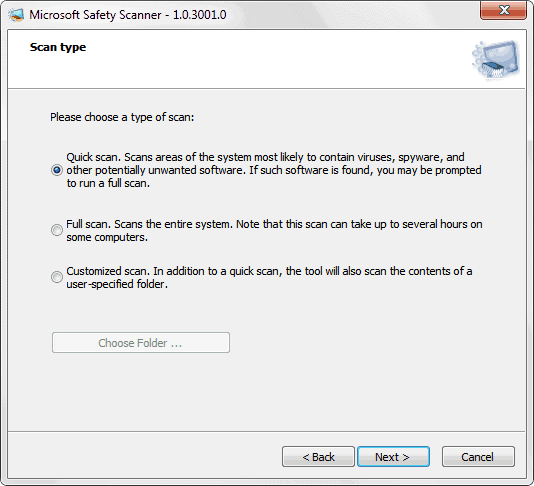
Microsoft Safety Scanner has been designed with simplicity in mind. The program can be started right after downloading or transferring it to a Windows PC. Only the depths of the scan needs to be selected, everything else is handled automatically by the application.
You can run a quick scan, full scan or customized scan. A quick scan will check the most likely areas on the system for malicious code like viruses, spyware or computer worms. A full scan on the other hand will scan every single file plus the memory and the Registry. A custom scan finally scans a user selected folder or drive.


microsoft safety scanner

There are a few things that you need to know before you download and run the application.
Read more...
Read more!

Sunday, June 5, 2011

21 Best Light Custom Windows 7 Theme

Static 2.0
Static 2.0 is definitely one of the most beautiful Windows 7 themes I used lately. I like the idea of the colorful taskbar icons, the colorful shell, the colorful Windows search. Color can be used so effectively and this theme makes use of it! I really hope that we something like this in Windows 8. The Metro UI is using a lot of colors as well, so if Windows 8 themes come close to this I will be very happy else we have to create some more custom Windows 8 themes.


Download: Static 2.0

Static Polished
Static Polished. An updated version of the Static theme above. If you are sick of round corners and no colors, you will ove this one.


Read more...
Read more!

Tuneup Utilities 2011


A new version of a large set of various tools for tuning and optimizing the system. With this program you can clean the disks of dust, remove invalid entries from the registry and defragment it, optimize memory, manage startup permanently delete files from the disc with a special utility TuneUp Shredder (further recovery becomes impossible, even with special programs) , to recover deleted files, change the look of Windows, and much more.


All utilities in this package integrated into a single graphical environment. To run a particular utility, choose its name from the list and click on her arm. After this, a dialog box in which you and all appropriate action. The package combines the important functions for system optimization, configuration, cleaning and maintenance in a modern graphical user interface.

DOWNLOAD

Read more...
Read more!

Saturday, June 4, 2011

Skype v5.3.0.108 x86-x64 2011 Silent Installs


Skype v5.3.0.108 x86-x64  2011 Silent Installs


Information:
Skype lets you make Internet-based VoIP (voice over Internet protocol) phone calls for free to anyone in the world who also uses Skype on their PC, and make inexpensive calls from your PC to landlines and cell phones worldwide. Skype uses P2P (peer-to-peer) technology to connect you to other users – not to share files this time, but to talk and chat with your friends. The technology is extremely advanced – but super simple to use... You’ll be making free phone calls to your friends in no time! It's also an instant messenger as well, because has integrated chat. Skype is the simplest way to save money on your phone bill. Skype does more than phone calls. It also lets you video chat and text chat as well, and send SMS messages. The newest version of Skype also features nifty integration with Firefox - you can call any phone number you see on a Web site with one click. Skype will automatically recognize your headset, microphone, and speakers, so you don't need to worry about configuration.

To call another Skype user, enter a user name, and you're ready to go. You can also save a list of users, so calling them back is simple. To call landlines and cell phones, you'll need to set up an account and buy credit. Then, whenever you make a call, that credit is used. Calling other people on Skype is free so you can talk whenever you want to – not just on special occasions. Call to check in with mum when you’re travelling, give your partner a goodnight kiss via video call when they’re away on business, or use it for your regular calls and catch ups. And, if you know people who don’t use Skype you can call them too at really low rates.

Popular and preeminent VoIP service Skype has wooed its fair share of people with an itch to ditch the landline and an Internet connection, especially those with international contacts. With its latest update to version 5, the company hopes to win over even more customers and keeping the current ones happy. Skype 5.0 features a streamlined interface, Facebok integration, and videoconferencing functionality. Last but not least, Skype now has Facebook integrated seamlessly into the interface. A tab along the top of the screen will take you into your news feed, where you can update your status as well as start Skype calls with various contacts.

Skype was founded in 2003 by Niklas Zennström and Janus Friis. Skype created a little piece of software that makes communicating with people around the world easy and fun. With Skype you can say hello or share a laugh with anyone, anywhere. And if both of you are on Skype, it’s free.

Skype is available in 28 languages and is used in almost every country around the world. Skype generates revenue through its premium offerings such as making and receiving calls to and from landline and mobile phones, as well as voicemail and call forwarding. Skype, based in Luxembourg, has relationships with a growing network of hardware and software providers and is an eBay company (NASDAQ: EBAY).

Features:

Read more...
Read more!

Thursday, January 27, 2011

Norton partition magic 9.0 2010


Norton partition magic 9.0 2010

اضغط هنا لتكبير الصوره


* Divides a single hard drive into two or more partitions
* Lets you safely run multiple operating systems on the same PC
* BootMagic™ makes it easy to switch between different operating systems
* Allows you to copy, move, resize, split, or merge partitions as needed without losing data
* How-to wizards guide you step by step through the partitioning process
* Intuitive Windows®-****d browser lets you find, copy and paste files in both Windows and Linux® partitions
* Allows you to create and modify partitions up to 300 GB*
* Supports USB 2.0, USB 1.1, and FireWire® external drives**
* Supports FAT, FAT32, NTFS, Ext2, and Ext3 file systems
* Converts partitions among FAT, FAT32, and NTFS without losing data
* Allows you to enlarge an NTFS partition without restarting your computer
* Resizes NTFS system clusters to the most effective size
  
Downlaod :

Read more...
Read more!

Friday, December 10, 2010

Windows 8 has a high-end PC user interface called Wind

Before the dust has even settled on Windows 7

, Winrumours, via the Italian Windows8italia site, has discovered that Microsoft’s next-gen OS will be 32-bit and 64-bit with two separate interfaces

Read more...
Read more!

Google ups YouTube video limits for selected users

Google has decided it’s time to increase the time limit on YouTube videos again, but the online video service is not increasing them for everyone.

In a post to the YouTube Blog, product manager Joshua Siegel and software engineer Doug Mayle made the announcement. Users are being selected for a limit increase based on them having, “a history of complying with the YouTube Community Guidelines and our copyright rules to upload videos that are longer than 15 minutes.”

What the new limit is has not been announced, so we can only assume it’s going to be somewhere in the region of 20-30 minutes .

Read more...
Read more!

Tuesday, December 7, 2010

Should I Turn My Computer Off at Night?

There are several reasons why it may be a good idea to turn off your computer at night. For some, it may not matter whether the computer is on or off. Most newer computers have a sleep mode when they are inactive which doesn't use much power. However, in businesses or at home, it may be wise to turn off the computer at night for security reasons.

For example, computers connected to the Internet via DSL or cable modem are vulnerable to hacking if they are still connected. You can either turn off the connection or turn off the computer. You may need to keep the computer turned on, conversely, if the computer is used as a fax machine as well.

Read more...
Read more!